
What it is
The Google Ads agent connects to your Google Ads account, studies how it is actually performing, and returns concrete recommendations a marketer can act on. When a recommendation needs a landing page, Flint builds it. When it needs a change inside Google Ads (a negative keyword, a paused keyword, a re-routed final URL, new ad copy, a new ad group or campaign), Flint drafts the exact change and applies it after you approve.
It is the same idea behind Flint's landing pages, extended one step earlier: instead of you deciding what to build, Flint reads the account and tells you what is worth building and changing, then does the work.
How it works
- 1.Connect your Google Ads account.
- 2.Flint researches the account across two angles: an audit of your existing Search campaigns (what is wasting spend, what is mismatched, what is underperforming), and a scout for net-new expansion (keywords, ad groups, and campaigns you should be running but are not).
- 3.Flint returns recommendations in an inbox, grouped by impact.
- 4.You review each one, chat with it to adjust, and approve or dismiss.
- 5.On approval, Flint executes the change: it builds the page, applies the Google Ads change, or both.
- 6.After a shipped change has run, Flint can measure its impact by comparing performance before and after.
Getting started
1. Connect Google Ads
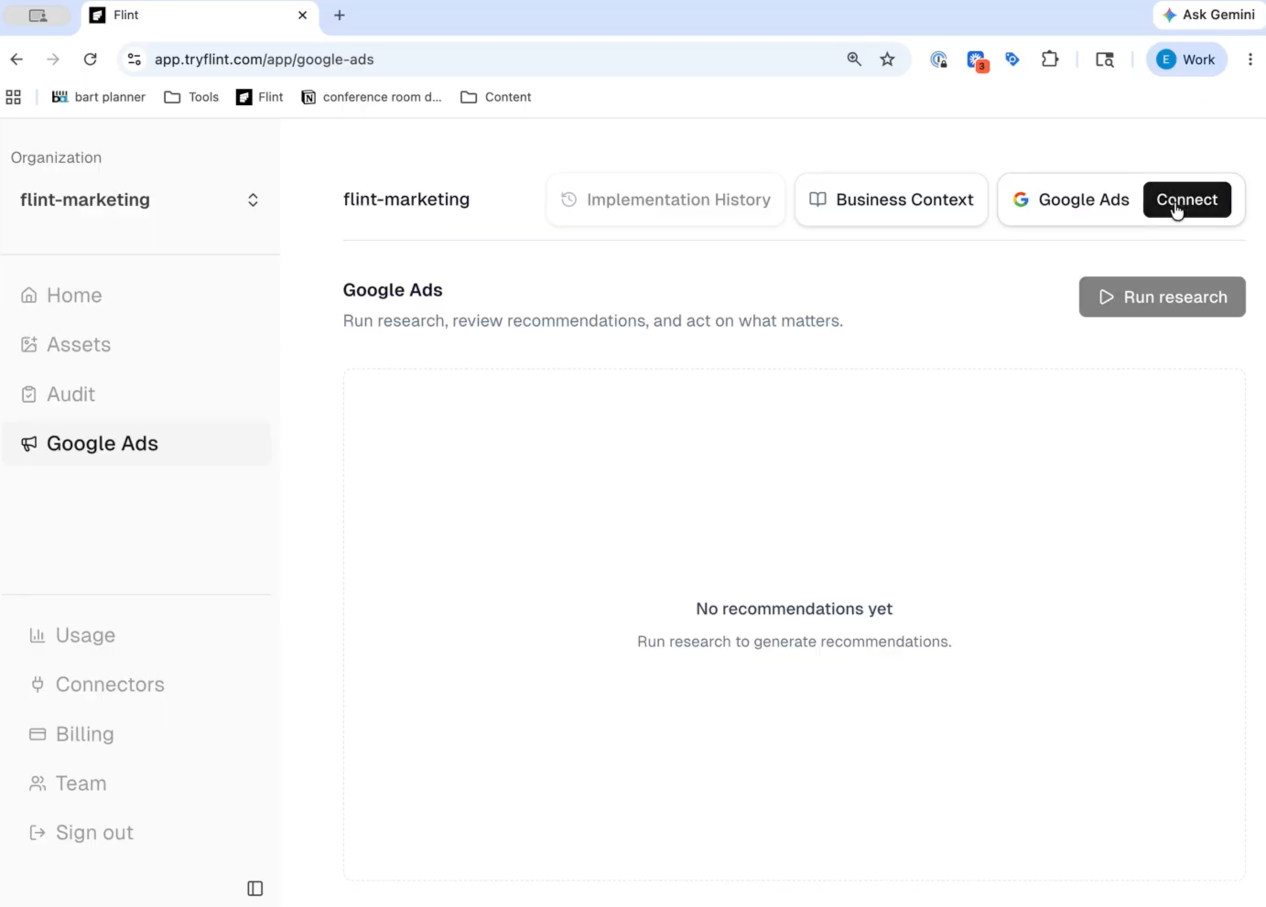
Open the Google Ads tab in the left sidebar and click Connect Google Ads. You will authorize Flint through Google's standard OAuth flow.
- •Manager (MCC) accounts are supported. If you connect a manager account, Flint walks the hierarchy so you can pick the specific account to work on, and you can switch accounts later from settings.
- •Flint reads your account and proposes changes. It never applies a change to your account without your explicit approval.
2. (Optional) Connect Slack
During setup you can connect Slack. When connected, Flint posts a summary to your channel every time a recommendation run completes, so the team sees new opportunities without logging in.
3. Get recommendations
You do not have to do anything to get your first batch.
- •Automatic on connect. Flint kicks off a first research run shortly after you connect.
- •On a schedule. Flint refreshes recommendations on a recurring basis (roughly every 48 hours) and delivers the results by email and, if connected, Slack.
- •On demand. Click Recommendations at the top of the Google Ads page any time you want a fresh run.
What Flint looks for
Flint focuses on Search campaigns. It grounds every recommendation in data it pulled from your account, including:
- •Keywords and search terms - the queries actually triggering your ads versus the keywords they matched, plus Google's quality and landing-page-experience signals.
- •Campaign and ad-group structure - bidding strategy, budgets, targeting, and how spend is distributed.
- •Responsive search ads - the headlines and descriptions running, and whether they match the page they point to.
- •Landing pages - per-URL performance, and high-spend destinations where a dedicated Flint page would convert better.
- •Keyword Planner API - Flint calls Google's Keyword Planner API (KeywordPlanIdeaService) for two purposes: generateKeywordIdeas for net-new keyword discovery from seed keywords and URLs, and generateKeywordHistoricalMetrics for search volume, competition, and bid estimates. This data powers the scout's expansion recommendations. Performance data for keywords your account already bids on comes from the standard Google Ads reporting API, not the Keyword Planner.
- •Change history and experiments - what has recently changed on the account and how past A/B tests turned out.
What Flint can do about it
Every recommendation falls into one of three execution channels:
| Channel | Description |
|---|---|
| Landing page only | Flint builds or updates a page, on-brand, on your domain. |
| Google Ads change only | Add a negative keyword, pause a wasteful keyword, fix a match type, re-route an ad's final URL, or flag a conversion-tracking issue. |
| Page and change together | When neither half works alone - for example, a new keyword cluster that needs a dedicated page and the ad-group change to route traffic to it. |
Recommendations span every level of the account: ad copy, keyword, ad group, campaign, landing page, and account-wide.
The recommendation inbox
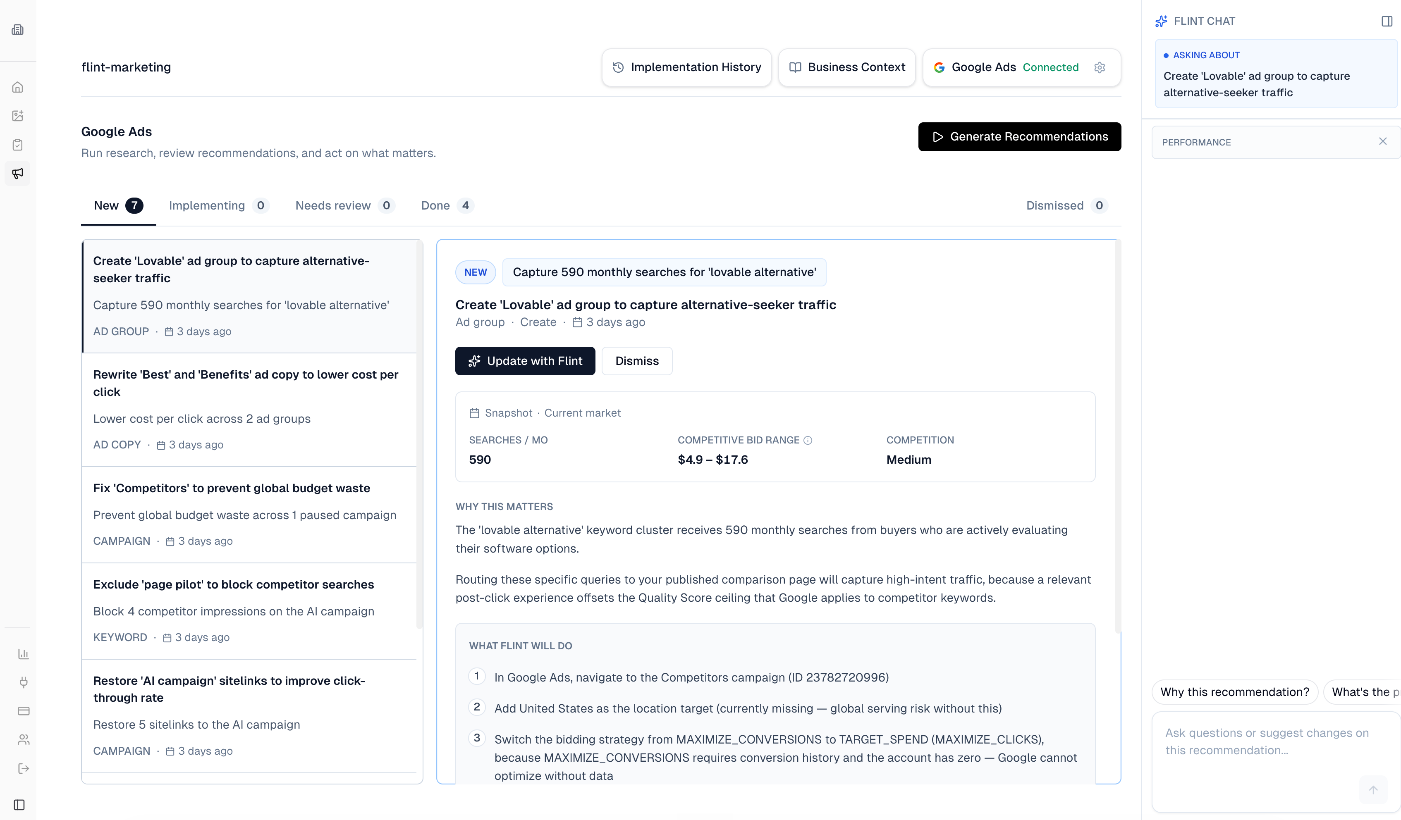
Recommendations arrive in an inbox you can filter and work through.
By impact:
- •High impact - the biggest expected wins.
- •Quick wins - small, low-risk changes.
- •Additional - everything else worth considering.
By type - Ad, Ad group, Keyword, Campaign, Landing page, or Account.
By status:
| Status | Meaning |
|---|---|
| New | Surfaced in the latest run and not yet looked at. |
| Needs review | Flint has prepared a change and is waiting on your decision. |
| Implementing | Approved and in progress. |
| Done | Completed. |
| Dismissed | Declined (you can tell Flint why, which improves future runs). |
Reviewing and approving
You stay in control of everything that touches your live account.
- •Each recommendation shows the exact steps Flint will take, with the affected campaigns, ad groups, and keywords named explicitly.
- •Before any change is applied, Flint re-checks the current state of the account and presents a plain-language summary of the change for you to approve. If the desired end state already exists, or the targeted entity has been paused or removed, Flint will skip the change rather than apply something stale.
- •You can chat with any recommendation to ask why it was made, request adjustments, or have Flint draft a new one. Page builds and Google Ads changes each have their own review step.
Memory: it learns your account
Flint builds memory from your account's own history, not generic best practice. It reads your past experiments, campaign launches, things you paused, and conversion-tracking choices, then works out why certain things performed for you and why others did not. That memory feeds future runs, so recommendations get more tailored over time and Flint avoids repeating suggestions you have already acted on or dismissed.
Impact reports
For a recommendation that has already shipped, Flint can measure its effect by comparing performance before and after the change, scoped to the exact entities it touched. These reads are framed as trends and early signals, not claims of statistical significance, and Flint flags anything it cannot measure honestly.
Who it's for
- •In-house marketers get a copilot that owns the pattern-recognition and page-production work, while the team keeps strategy and creative direction.
- •Agencies can use it to surface and implement opportunities between client check-ins.
In both cases, nothing ships without a human approving it.
Limitations
- •Search campaigns only. Display, Video, Shopping, and Performance Max are out of scope for now. If an account has no Search campaigns, Flint will say so rather than guess.
- •Requires a connected Google Ads account. The audit works from your existing campaigns; expansion ideas build on that context.
- •Approval-gated. Flint proposes; you approve. It will not change your live account on its own.
Pricing
The Google Ads agent is included in your Flint plan. Research runs and page builds consume credits like the rest of Flint. See your plan's credit allowance on the pricing page.
FAQ
Will Flint change my account without asking? No. Every change to your live Google Ads account requires your explicit approval, and Flint re-verifies the account state right before applying anything.
Do I need existing campaigns? Yes. Flint audits the Search campaigns you are already running and uses that context to recommend net-new keywords, ad groups, and campaigns.
What if I connect a manager account? Supported. Flint walks the hierarchy and lets you choose which account to work on, and switch later.
How often does it run? Automatically on connect, then on a recurring schedule (about every 48 hours), plus any time you click Recommendations. Results are delivered by email and, if connected, Slack.
Can I tell it when it's wrong? Yes. Dismiss a recommendation with feedback, or chat with it directly. Both shape future runs.
